
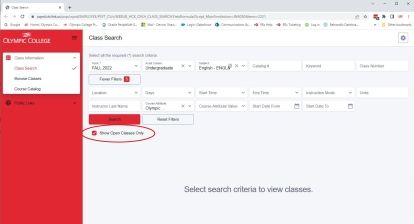
If the class you want is full, and you meet prerequisites, you can 'waitlist' the class.
To determine availability, use the Class Search feature in ctcLink, and select 'Show Open Classes Only.'
Sign Up for a Waitlisted Class
- Use the ctcLink Student Homepage to swap and drop classes.
- If the class you want is full and you meet required prerequisites, you will be given the option to join the class waitlist.
Note: for additional info, watch our How to Enroll video.
Check Your Status
You will be placed in the class as soon as an opening occurs.
- Use the ctcLink Student Homepage to verify your waitlist status.
- Click 'Show Waitlisted Classes' on the 'View My Classes' tab of the ctcLink Student Homepage.
- Your waitlisted class will appear on the screen.
- Click 'Show Enrolled Classes' to see a display of courses you are enrolled in.
- If you are not added to the class before the class starts, see Over-Enrollment instructions in the section directly below this one.
Financial Aid: If you are receiving Financial Aid, your waitlisted class does not count toward your required credits until you are actually enrolled in the course. Financial Aid will only pay once you are enrolled in the correct minimum number of credits. Contact the Financial Aid office for more information.
Over-Enrollment on the First Day of the Class
If a class is full, you may:
- Attend the class on the first day of the class.
- If your instructor agrees, written permission from instructors is needed by Registration. Please have instructor email, or student forward, instructor’s email to @email.
Over-enrollments will be honored through the first 10 days of the term.
Note: Students may be placed into classes the morning of the first day of the quarter. See 'Check Your Status' above for instructions.
Remove Yourself From a Waitlist
- Use the ctcLink Student Homepage to remove yourself from a waitlist.
Waitlist Registration Restrictions
- No course conflicts (enrolling in a waitlist/class that has the same discipline and course number)
- No time conflicts (including overlapping times)
- Limit of three waitlists per quarter
- If your schedule contains a restriction, Olympic College may remove the restricted class/waitlist from your schedule.